Archive

Archive for the ‘Computers’ Category

Green Code

February 28th, 2010 GilesBathgate No comments

Green code is code that has been commented out. Its usually green because the popular development environments I use syntax highlight the comments in green. In my personal opinion having large chunks of commented out code is a violation of YAGNI. A much better approach than commenting out the code is just to remove it, if you are using  source control, which surely you must be? a record of it will be stored in version control. Doing this has two advantages, firstly the current source code has less clutter, and secondly the source code is kept historically in version control along side the code that it was meant to work with. Keeping the code commented out along side the current code is daft, unless you think that un-commenting out the code six months later it will still work, which in most cases it probably won’t.

Categories: Computers Tags:

Music Player Daemon on the MusicPal

August 8th, 2009 GilesBathgate 11 comments

Some time ago I recived a MusicPal as a gift. Out of the box the device is great fun, and made a very good present. The device is designed to work as an internet radio, It can connect to a wireless network and stream radio from various internet radio stations. However the device does have a few limitations when you want to play your own music. The device can connect to Media servers that use the UPnP Media Devices Protocol and the device is operated using two rotary knobs. For me the combination of these two features is the major design flaw in the product.  I don’t want to walk over to the device, twiddle some knobs and play a tune that is on my laptop, instead I want to select songs from my laptop and queue them up for playing on the device. There are two remote control applications for the MusicPal, one which is accessible through a web interface, and another which is Windows™ software. However both of the remote control applications are useless, all one can do is pause music, you can’t select a new song to be played, change the position of playback or even fast-forward and rewind!

Well a while ago,  I found a blog from someone who goes by the name of Nerdy Toad who was trying to run Music Player Deamon on his MusicPal.  At the time he had only managed to make a test sinewave come out of the devices internal speaker, and we worked together to see if we could get output from the line-out of the device. We were somewhat unsuccessful. However, about half a year later, someone called Maz took our research further. He was able not only to get sound fully working on the device, he was also able to patch Music Player Deamon to work on the device aswell.

For anyone else who has a MusicPal and wants to use it in conjunction with Linux you will need to do the following. First you have to enable the telnet interface for the device. You can enable it via a hidden web interface page:

http://musicpal/admin/cgi-bin/debug

You can then telnet to the device, login as root, and issue the following command.
wget http://musicpal.v3v.de/cifs/cifs.ko

This will get you a kernel module will will allow you to access a samba share on the device. This is important because the device has very limited disk space, and so its preferable to put mpd, config files, etc. In a samba share. Of course you will probably have your mp3 files in a samba share aswell. You will need to create an smb.conf on the machine that you will be sharing files from, (not the MusicPal). This is my smb.conf

[global]
server string = masala
security = SHARE
guest account = giles
[mpd]
comment = mpd
path = /home/giles/mpd
guest ok = Yes
read only = No
[music]
comment = Music
path = /home/giles/Music
guest ok = Yes

In my setup I have mpd on the machine sharing music, this is because of the limited space on the MusicPal, so still on this machine download the mpd binary

wget http://musicpal.v3v.de/mpd-testing/mpd.tar.gz

Then expand the gzip into the mpd directory. You will have to modify the mpd.conf file so that the directories are correct. Once you have done all this, you can mount the shares from the MusicPal telnet session

mount -t cifs //192.168.2.4/mpd /tmp/mnt/mpd
mount -t cifs //192.168.2.4/music /tmp/mnt/mpd/music

Finally from the telnet session you can launch mpd. Back on the client you should now be able to connect to mpd via your favorite mpd client program.

Categories: Computers, Linux Tags: , , ,

Webcam in Linux on Sony VGN-BX61MN

July 22nd, 2009 GilesBathgate 6 comments

For anyone interested in using linux on this laptop, the following should be of help. The camera is labeled as Motion Eye but lsusb reports the device as:

05ca:1839 Ricoh Co., Ltd Visual Communication Camera VGP-VCC6 [R5U870]

After alot of messing around and installing defunct kernel modules, that seem to work, but actually include the wrong firmware versions. I found that the work being done by Alex Hixon on a generic R5U87x driver to be the most up to date. Previously the project rolled its own kernel module to support the camera, However the current version works by providing userspace tools to upload firmware to the device so that the standard uvcvideo driver in the kernel can communicate with the camera.

Unfortunately there wasn’t much around in the way of a howto to explain how to use the code. So I had to figure out the following for myself.

First of all install mercurial and some other project dependencies

sudo apt-get install mercurial libglib2.0-dev libusb-dev

Now you can download the source

hg clone http://bitbucket.org/ahixon/r5u87x/

Change into the source directory and issue the following three commands.

cd r5u87x
make
make rules
sudo make install

If your user isn’t part of the video group you will probably have to modify /etc/group and make yourself a member of that group otherwise you might experience Permission Denied errors.

After you have rebooted you can test using mplayer

mplayer tv:// -tv driver=v4l2

Also make sure you can record because uploading the wrong firmware will in some cases allow you to see output but not record it.

mencoder tv:// -tv driver=v4l2:device=/dev/video0 -nosound -ovc lavc -o test.avi

If you want to clean things up afterwards you can run the following commands
sudo apt-get --purge remove mercurial libglib2.0-dev libusb-dev
sudo apt-get --purge autoremove
rm -r r5u87x

You may find the above steps also work for the following devices:

05ca:1830 Ricoh Co., Ltd Visual Communication Camera VGP-VCC2 [R5U870]
05ca:1832 Ricoh Co., Ltd Visual Communication Camera VGP-VCC3 [R5U870]
05ca:1833 Ricoh Co., Ltd Visual Communication Camera VGP-VCC2 [R5U870]
05ca:1834 Ricoh Co., Ltd Visual Communication Camera VGP-VCC2 [R5U870]
05ca:1835 Ricoh Co., Ltd Visual Communication Camera VGP-VCC5 [R5U870]
05ca:1836 Ricoh Co., Ltd Visual Communication Camera VGP-VCC4 [R5U870]
05ca:1837 Ricoh Co., Ltd Visual Communication Camera VGP-VCC4 [R5U870]
05ca:1839 Ricoh Co., Ltd Visual Communication Camera VGP-VCC6 [R5U870]
05ca:183a Ricoh Co., Ltd Visual Communication Camera VGP-VCC7 [R5U870]
05ca:183b Ricoh Co., Ltd Visual Communication Camera VGP-VCC8 [R5U870]
05ca:183e Ricoh Co., Ltd Visual Communication Camera VGP-VCC9 [R5U870]

Categories: Computers, Linux Tags: , , ,

Sidechaining in Reason

April 2nd, 2008 GilesBathgate 1 comment

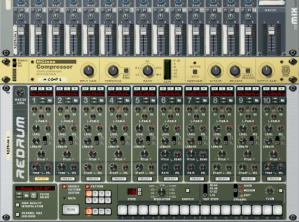
Here is how I do sidechain compression in Reason. In this example I am going to use a kick for the sidechain source, which can give the output of the compressor a bouncy catchy effect.

First of all you want to setup a default rack with a 14:1 Mixer, an MClass Compressor and a Redrum, make sure when you add the compressor its auto routed as an effect send to the mixer.

Now flip the rack and connect the Redrum’s Send 1 to the Left(mono) channel of the sidechain input on the compressor. Note that the sends from Redrum are mono outputs.

Program a basic 4/4 kick drum pattern into the Redrum device. You can add claps snares or anything else you like they will not be being sent to the compressor at this time until you turn the send knob for a particular Redrum channel.

Once the Redrum is setup how you like you can now send the kick drum to the sidechain by turning the send knob for the kick channel all the way to the right. Note that this doesn’t stop the kick from being sent to the mixer.

You can lower the compressors Threshold and raise its Ratio until you see the kick drum really pump the VU meter. Now that the compressor is pumping we need to give it something to compress. Add a synth to the rack and make sure its auto routed to the mixer. Turn up the aux send of the channel to which the synth was added.

When you play notes on the synth you will hear it go quieter when the kick drum is playing. This can be a useful way to make synth baselines fit better in the mix.

The advantage of using sends rather than using the single channel output of the Redrum are two fold. Firstly the kick drum is not muted and does not need further splitting using a Spider Audio Merger & Splitter. Secondly other elements of the beat can be sent to the sidechain in varying amounts. The advantage of using the compressor as a effect send is that many instruments can have the same compression added to them by altering the aux send of each channel.

Categories: Computers, Music Tags:

How to write an operating system

April 1st, 2008 GilesBathgate No comments

This is a quick guide to creating a ‘Hello World’ Operating system that can be booted by Grub First of all you will need to create the assembly file the contains the entry point for grub. Call this ‘start.S

Read more…

Categories: Computers, Linux Tags:

Installed Flock

February 29th, 2008 GilesBathgate No comments

Much better than Firefox or Sage is Flock, it integrates with social websites such as Facebook, YouTube, Flickr and others. It allows you to integrate the browser with your own hosted weblog, and create RSS aggregates.

Blogged with Flock

Categories: Computers Tags:

Firefox

February 27th, 2008 GilesBathgate No comments

I have finally given up and installed firefox again. I was a little disapointed that the ‘Live bookmarks’ feature was not as good at displaying news feeds as Internet Explorer, however I quickly rectified this situation by Installing Sage

Categories: Computers Tags:

Mplayer on Tom Tom

February 8th, 2008 GilesBathgate 5 comments

I am now trying to run Mplayer on Tom Tom so that I can watch videos and drive anyone reading this to drink. I found however that Mplayer requires a lot of system resources that are being used by the Navigation application (ttn) So I needed a way to free up the memory and resources being used by the application. This should be as simple as just killing the application using

killall ttn

But the problem is that the ttn application is responsible for petting the dog. That is to say that there is a WatchDog Timer which resets the device after 15 seconds unless something continuously resets the timer.
All that was needed was a script to reset the timer instead, So here is my solution:

#!/bin/sh
killall ttn &&
while(true) do
echo '\0' > /dev/watchdog
sleep 10
done

The trick is to kill the ttn but also keep the Watchdog from reseting the device. The script also has to be invoked as a background job, so I used an ‘&’ after the command.

./free.sh &
Categories: Computers, Movies, TomTom Tags:

Reason 4.0

January 9th, 2008 GilesBathgate No comments

My long awaited free Upgrade to Propellerheads Reason 4.0 has finally arrived. Propellerheads seem to have been quite smart in thier way of delivering upgrades, rather than distributing two versions of thier product they simply distribute the full version only. The upgrade verification is done by registering your old version online and entering an upgrade code at which point they will email you the full version product key.

Categories: Computers, Music Tags:

Tricubic interpolation

December 11th, 2007 GilesBathgate No comments

I have been thinking a lot about how to convert between various frame rates. Basic frame rate conversion works by dropping or duplicating frames. For example converting 30fps material to 25fps material will drop one frame in every six. More advanced techniques such as those employed by Motion Perfect or MSU AFRC are able to create new frames based on the existing frames that exist. These frames are more than a simple blend of the existing frames and use motion detection algorithms to resolve an intermediate frame from two source frames.

The approach that I would like to try is to use tricubic interpolation this is similar to the well known bicubic interpolation that is used to scale images in two dimensions. Tricubic interpolation operates in three dimensions x y and t. While there exists a library for calculating interpolated points in three dimensions, I have no clue how to use the library for my purposes because I do not yet fully understand how to compute the numerical derivatives.

Categories: Computers, Movies Tags: