I have finally given up and installed firefox again. I was a little disapointed that the ‘Live bookmarks’ feature was not as good at displaying news feeds as Internet Explorer, however I quickly rectified this situation by Installing Sage
Category: Computers
Reason 4.0
My long awaited free Upgrade to Propellerheads Reason 4.0 has finally arrived. Propellerheads seem to have been quite smart in thier way of delivering upgrades, rather than distributing two versions of thier product they simply distribute the full version only. The upgrade verification is done by registering your old version online and entering an upgrade code at which point they will email you the full version product key.
Tricubic interpolation
I have been thinking a lot about how to convert between various frame rates. Basic frame rate conversion works by dropping or duplicating frames. For example converting 30fps material to 25fps material will drop one frame in every six. More advanced techniques such as those employed by Motion Perfect or MSU AFRC are able to create new frames based on the existing frames that exist. These frames are more than a simple blend of the existing frames and use motion detection algorithms to resolve an intermediate frame from two source frames.
The approach that I would like to try is to use tricubic interpolation this is similar to the well known bicubic interpolation that is used to scale images in two dimensions. Tricubic interpolation operates in three dimensions x y and t. While there exists a library for calculating interpolated points in three dimensions, I have no clue how to use the library for my purposes because I do not yet fully understand how to compute the numerical derivatives.
ReInstalled WordPress
I reinstalled wordpress using my hosting services 1-click-scripts feature it was a lot less painful
Convert 4:3 to 16:9 Pal
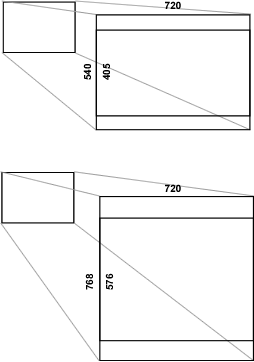
I had some video footage at 4:3 aspect which I wanted to scale and crop to fit a 16:9 wide-screen PAL format. My first attempt was to scale the video to 720×540 (maintaining the 4:3 aspect ratio) and then crop to 720×405 (a 16:9 ratio)
mplayer -vf scale=720:540,crop=720:405 movie.mpg
However PAL has a resolution of 720×576 so I then had to scale the video again
mplayer -vf scale=720:540,crop=720:405,scale=720:576 -aspect 16/9 movie.mpg
What I wanted was to do this in a more simple manner. I realised that I mearly need to scale it to be larger in the first operation, But how much larger? Well since I wanted to crop the same proportion of the image I simply needed to calculate the aspect of the cropped proportion. Which was 540/405 or 4/3 So I actually want my video to be 4/3 taller than its final height. So we want the movie to be 576 × 4/3 = 768
mplayer -vf scale=720:768,crop=720:576 -aspect 16/9 movie.mpg
Streaming Video using netcat?
Here is how one can crudely stream video over the network.
On the server run:
nc -l -p 5500 < video.mpg
And on the client run:
nc 192.168.55.8 5500 | mplayer -cache 8192 -
Ed is a duck
Human: Ed is a duck.
Computer: Ok ed is a duck.
Human: Ducks can fly.
Computer: Ok ducks can fly.
Human: Can Ed fly?
Computer: Yes.
Human: But Ed is dead.
Computer: Ok Ed is dead.
Human: Can Ed Fly?
Computer: Yes.
Human: Dead things cannot fly.
Computer: Ok dead things cannot fly.
Human: Can Ed fly?
Computer: No.
Computers are stupid, they do not have any common sense. You or I would know that ed cannot fly as soon as we were told that ed is dead, but a computer lives in a closed world and as such cannot make any assumptions. This is a good thing because the world would be a very different place if computers did make assumptions. However to make a computer give intelligable answers to questions you need a rules engine.
A Rules engine could consist of a set of processes, i.e a process for each rule that you want to assert to be true. The process could consist of reading some information from a system and then making decisions based on the information. In other words procedural programming.
However, this approach is rather tedious. What you might rather do is describe the set of constraints that must hold true, and have a set of processes generated automatically.
Well that sounds nice, but is it even possible? Well actually yes, and that is what Rules Engines, Constraint based programming 5GL’s are all about.
Loading youtube videos onto my mobile.
I wanted to view youtube videos on my phone, but unfortunately the mobile youtube site seems to have less content than the full site. So I decided to make my own mobile phone compatible video files and upload it to my phone. First things first I needed to get the flash video file from the youtube URL, which can be done with this handy site. Next i needed to convert the flash video into a .3gp file that is compatible with my mobile phone. This can be done using ffmpeg (I used a windows version of ffmpeg)
I converted the flash video using the following command.
ffmpeg -i movie.flv -s qcif -r 12 -b 30k
-ar 8000 -ac 1 -ab 12.2k movie.3gp
Finally I copied the files into the video folder on my phone using standard USB Storage Media drivers in windows, which simply present my phone to me as if it were a Hard Drive.
Make a DVD out of just about any video file.
I recently decided to try to transcode an .mp4 (quicktime) movie to burn on to a dvd. Using a windows version of MPlayer and following these instructions I started the transcoding process.
mencoder -oac lavc -ovc lavc -of mpeg -mpegopts format=dvd:tsaf
-vf scale=720:432,expand=720:576,harddup -srate 48000 -af
lavcresample=48000 -lavcopts vcodec=mpeg2video:vrc_buf_size=1835:
vrc_maxrate=9800:vbitrate=5000:keyint=15:vstrict=0:acodec=ac3:
abitrate=192:aspect=16/9 -ofps 25 -o movie.mpg movie.mp4
This was not the end of the story however. The next step was to convert the output MPG file info a DVD filesystem. This was done using DVDAuthour fortunately version 0.6.9 comes in precompiled windows binaries. The documentation for DVDAuthour was a little flakey however the easiest way was to create the XML file
<dvdauthor>
     <vmgm />
     <titleset>
         <titles>
             <video format="pal" aspect="16:9" resolution="720x576"/>
             <pgc>
                 <vob file="movie.mpg" />
             </pgc>
         </titles>
     </titleset>
 </dvdauthor>
And then build the dvd filesystem using
dvdauthor -o ./dvd -x dvdauthour.xml
Finally I have to burn the files to disk using the windows version of growisofs (which requires mkisofs) Using the command
growisofs -dvd-compat -Z e: -dvd-video -V "VIDEO_DVD" ./dvd
Installed WordPress
I decided to install wordpress. It was surprisingly easy once I had checked that my server supported the requirements, (which was the hardest part) and that I could overlay the WordPress database tables into the wiki database. It was a doddle.
 Giles Bathgate